
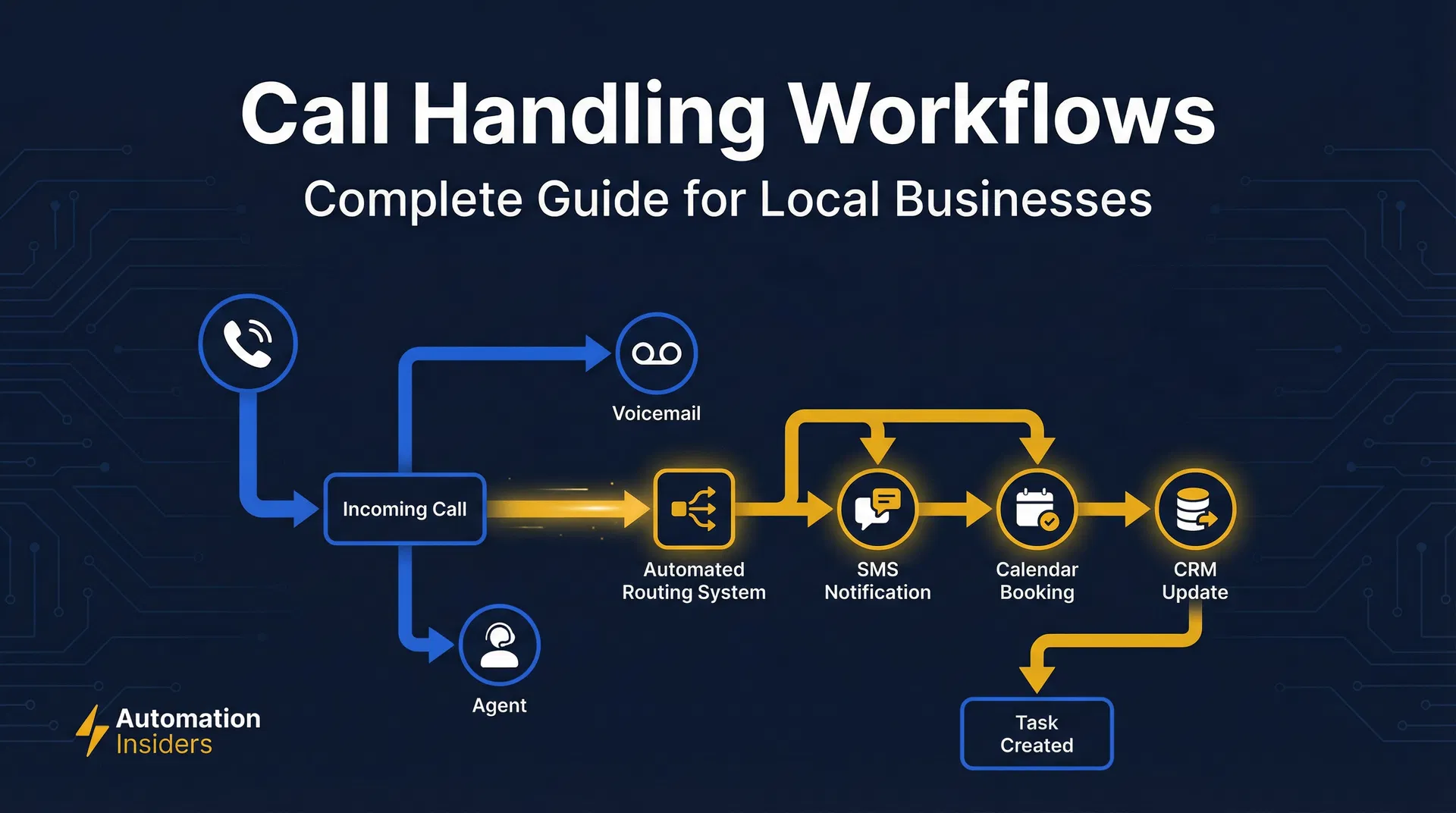
Before you commit to any automation platform, you need to understand the real cost. Our GoHighLevel pricing breakdown shows you exactly what’s in each plan and where the true value lies for a service business.
Use our missed call revenue calculator to see exactly how much this is costing your business. The phone rings. A new lead. A customer ready to book. Or an existing client with a fire to put out. If you run an HVAC company, a dental practice, a roofing crew, or an auto repair shop, you know that every call is a moment of truth. But what happens when you miss it? What if your team is swamped? Or your follow-up is a mess? Every missed call isn't just an oops. It's a direct hit to your bank account and your reputation. Consider this: a plumber missing just three calls a day, with an average job value of $280, is losing $840 daily. Over a month, that's over $16,000 in lost revenue. And 62% of callers won't even bother to leave a voicemail. They'll just call the next guy. Research by the Local Search Association shows that 70% of mobile searchers call a business directly from search results, making phone calls a primary conversion channel for local services. Missing these calls means missing direct conversions.
This is why you have to master GoHighLevel call workflows. It’s not optional. It’s essential if you're serious about growing your business. GoHighLevel (GHL) is more than just a CRM. It's an all-in-one automation powerhouse built to streamline your communication. It’s the best way to make sure no lead slips through the cracks and every customer interaction is a win. As a business owner, you need systems that work as hard as you do—systems that turn calls into cash. A study by InsideSales.com found that businesses that follow up with web leads within 5 minutes are 9 times more likely to convert them, and GHL’s call workflows can ensure this rapid response time.
Let's cut the fluff. We're going to show you exactly how to use GoHighLevel’s call management features. We'll cover everything from setting up your phone numbers and smart routing to automating follow-ups and analyzing your call data. The goal is simple: make your team more efficient, delight your customers, and grow your business by making every single call count.
Setting Up Your GoHighLevel Phone Numbers
First things first, you need the right phone numbers. GoHighLevel’s Twilio integration lets you buy local or toll-free numbers right inside the platform. This gives you total control over your call settings from one place, eliminating the need for separate phone system subscriptions that often cost an additional $50-$100 per month. This consolidation alone can save a small business $600 to $1,200 annually, not including the time saved managing multiple platforms.
Acquiring and Configuring Your GHL Phone Number
Your phone number is the front door to your business. Getting it right in GoHighLevel is easy, but it's also critical. In your sub-account, go to Settings > Phone Numbers. This is your command center for everything telephony. Here, you can add a new number, pick your country and area code, and decide between local or toll-free. A local plumbing shop in Dallas, for example, would be smart to grab a 214 number to look like a neighbor and build instant trust. This local presence can increase call answer rates by up to 20% compared to out-of-area numbers, according to a survey by Clutch. Once you have your number, click Edit Configuration to control how incoming calls are handled.
Inside the configuration settings, you have some important choices. Give your number a Friendly Name like "Main Office Line" or "Sales Inquiries" so your team knows what’s coming. Then, decide where Calls Go To. You can route them to a specific person, an IVR menu ("Press 1 for Sales, 2 for Support"), or even a Conversation AI bot to screen calls. Your Ring Options let you choose how your team gets notified—via the GHL Web App, Mobile App, their cell, or a VoIP desk phone. Remember, 80% of business calls are not answered on the first attempt, so strategic routing is non-negotiable. For a service business, a missed call often means a lost job. A study by the Harvard Business Review found that companies that responded to customer inquiries within an hour were nearly 7 times more likely to qualify the lead than those who tried even an hour later. GHL's routing options are designed to minimize these delays.
For example, a busy auto repair shop might set up their main line to ring all available mechanics' mobile phones simultaneously for 15 seconds. If no one answers, it could then route to the front desk. If still unanswered, it could go to a GHL Conversation AI bot programmed to collect the caller's name, vehicle issue, and preferred callback time, then immediately send an SMS confirmation and create a "Missed Call - AI Qualified" opportunity in the CRM. This multi-stage routing ensures that even if a human is unavailable, the lead is captured and nurtured, preventing the 62% of callers who won't leave a voicemail from simply calling a competitor.
Call Forwarding and Recording Options
Beyond basic routing, GHL offers powerful call forwarding and recording capabilities. Under the Forward Calls To section, you can specify external numbers or even a custom URL for advanced integrations. This is particularly useful for businesses with an answering service or an overflow call center. For instance, an HVAC company could forward calls after 5 PM to an emergency service line, ensuring 24/7 coverage without needing staff on site.
Call Recording is another critical feature. By enabling Record Calls, every inbound and outbound call made through that GHL number is automatically recorded and stored within the contact's record. This is not just for compliance; it's a powerful training tool. Reviewing recorded calls allows you to:
- Improve Sales Techniques: Identify what works and what doesn't in closing deals. A sales manager can review calls to pinpoint areas where a team member might be struggling, providing targeted coaching. For example, if a roofer's sales team consistently fails to upsell premium materials, reviewing calls can reveal if they're not asking the right questions or presenting the benefits effectively.
- Enhance Customer Service: Understand customer frustrations and common questions. This data can inform FAQ sections on your website or improve internal scripts. A dental practice can analyze recordings to identify recurring patient concerns about billing or appointment scheduling, then refine their front desk protocols.
- Resolve Disputes: Have an objective record of conversations. If a client claims they were promised a specific price or service, the recording provides undeniable proof, potentially saving thousands in dispute resolution.
- Monitor Quality Control: Ensure your team is adhering to company policies and providing a consistent brand experience. This is especially important for businesses with multiple technicians or service providers.
However, be aware of local and state laws regarding call recording. In some jurisdictions, you need to inform callers that the conversation is being recorded (a "one-party consent" state), while in others, all parties must consent (a "two-party consent" state). GHL provides an option to play a "Call Recording Disclosure" message automatically at the start of each call, helping you stay compliant. This small step can prevent legal issues and build customer trust by being transparent.
Smart Call Routing Strategies
Once your numbers are set up, the real automation begins with smart call routing. This isn't about simply directing calls; it's about directing calls intelligently to maximize conversions and customer satisfaction.
Time-Based Routing
Your business isn't open 24/7, but your customers might try to reach you at any time. Time-based routing ensures calls are handled appropriately, whether it's 9 AM on a Tuesday or 11 PM on a Saturday.
In GHL, you can set up specific routing rules based on the day of the week and time of day. For example:
- During Business Hours (e.g., M-F, 9 AM - 5 PM): Route calls directly to your sales team or front desk. You might use a "Round Robin" distribution to ensure an even workload among your staff, or a "Weighted Distribution" if certain team members are more experienced or handle specific types of inquiries. This ensures that the 80% of calls that come in during business hours are handled by an active human, significantly increasing the chance of conversion.
- After Business Hours/Weekends: Instead of letting calls go to an unanswered ring or a generic voicemail, route them to:
- An IVR Menu: "Thank you for calling [Your Business Name]. Our office is currently closed. For emergency service, press 1. For all other inquiries, please leave a message or visit our website at [website address]."
- A GHL Conversation AI Bot: This bot can engage with the caller, gather information, answer common questions, and even schedule appointments, all while your team is off duty. This transforms a missed call into a qualified lead, potentially capturing business that would otherwise go to a competitor. A well-configured AI bot can handle up to 70% of routine customer inquiries, freeing up your staff for more complex tasks.
- An Emergency Line: For businesses like plumbers, electricians, or locksmiths, having a dedicated emergency line that rings an on-call technician is crucial. This can be configured to forward to a specific mobile number or a rotating on-call schedule. Capturing just one emergency service call after hours can easily generate $300-$500 in immediate revenue, justifying the automation setup.
Implementing time-based routing drastically reduces missed opportunities. Instead of a potential customer hearing a dead end, they get an immediate, structured response, improving their perception of your business and increasing the likelihood they'll convert.
IVR (Interactive Voice Response) Menus
IVR menus are more than just "Press 1 for Sales." They are powerful tools for pre-qualifying leads, directing inquiries to the right department, and improving caller experience.
To set up an IVR in GHL:
- Go to
Automation>Workflows. - Create a new workflow triggered by an
Inbound Call. - Add an
IVR Menuaction. - Record or upload an audio message (e.g., "Welcome to [Your Business Name]. For new appointments, press 1. For billing inquiries, press 2. For technical support, press 3. To speak with a representative, press 0.").
- For each key press, create a branch that routes the call accordingly.
Practical Applications:
- Dental Practice: "Press 1 for new patient appointments" (routes to front desk), "Press 2 for existing patient questions" (routes to patient coordinator), "Press 3 for billing" (routes to billing specialist). This ensures callers reach the most qualified person immediately, reducing transfer times and improving efficiency.
- HVAC Company: "Press 1 for new system quotes" (routes to sales), "Press 2 for service and repairs" (routes to dispatch), "Press 3 for emergency service" (routes to on-call technician). This prioritizes high-value calls and urgent requests.
- Auto Repair Shop: "Press 1 to schedule an oil change" (routes to service advisor), "Press 2 for diagnostic questions" (routes to head mechanic), "Press 3 for parts department."
A well-designed IVR can reduce the number of calls handled by a general receptionist by 30-40%, allowing them to focus on more complex tasks. It also reduces caller frustration by getting them to the right person faster.
Round Robin and Weighted Distribution
For businesses with multiple team members handling calls, GHL offers two primary distribution methods:
- Round Robin: This distributes calls evenly among a group of users. If you have three sales reps, the first call goes to Rep A, the second to Rep B, the third to Rep C, the fourth back to Rep A, and so on. This ensures fairness and prevents any single team member from being overwhelmed. It's ideal for sales teams where all reps are equally qualified to handle incoming leads.
- Weighted Distribution: This allows you to assign a "weight" to each team member, determining how frequently they receive calls. For example, if you have a senior sales rep who closes 2x more deals than a junior rep, you might give the senior rep a weight of 2 and the junior rep a weight of 1. This means the senior rep receives twice as many calls. This method is excellent for optimizing conversion rates by directing more leads to your top performers.
To set this up, in your call workflow, after an IVR selection or direct routing, use the Assign to User action and select either Round Robin or Weighted Distribution. You can then select the specific users who should be part of this distribution group. This ensures that every incoming call has the highest chance of being answered by the most appropriate person, directly impacting your bottom line. Businesses using intelligent lead distribution methods report an average increase in lead conversion rates of 10-30%.
Automating Follow-Ups and Missed Call Handling
A missed call is not a lost cause. With GoHighLevel, it's an opportunity for automated recovery. The goal is to re-engage the caller immediately, before they call a competitor.
Missed Call Text Back (MCTB)
This is one of the most powerful and easy-to-implement GHL workflows. When a call comes in and isn't answered, an automated SMS is sent to the caller.
Workflow Setup:
- Trigger:
Inbound Callwith a filterCall Status is No Answer. - Action:
Send SMS. - SMS Content: "Hi [Contact.FirstName], sorry we missed your call from [Your Business Name]! We're currently assisting other customers. How can we help you today? Reply here or call us back at [Your Phone Number]."
Why it works:
- Instant Response: The text is sent within seconds of the missed call. This speed is critical; 78% of customers buy from the company that responds first.
- Convenience: Many people prefer texting to calling back, especially if they're busy.
- Lead Capture: Even if they don't respond immediately, you've opened a communication channel and captured their contact information in GHL.
- Professionalism: It shows you're attentive and proactive, even when busy.
A local gym implemented an MCTB workflow and saw a 35% increase in re-engagement from missed calls, converting an additional 10-15 leads per month into new memberships, each valued at an average of $600 annually. This simple automation can turn hundreds or thousands of dollars in lost revenue into captured sales.
Voicemail Drop Automation
Sometimes, a call goes to voicemail. Instead of leaving a generic message, GHL allows you to "drop" a pre-recorded voicemail automatically. The caller hears a full, professional message, but your team member doesn't have to spend time recording it manually.
Workflow Setup:
- Trigger:
Inbound Callwith a filterCall Status is Voicemail. - Action:
Voicemail Drop. - Upload Audio: Record a concise, professional message (e.g., "Hi, this is [Your Name] from [Your Business Name]. I'm sorry I missed your call. Please leave your name and number, and I'll get back to you as soon as possible. Alternatively, you can reply to the text message we just sent you. Thanks!").
This saves your team valuable time, especially for high-volume call centers, and ensures a consistent, high-quality message every time. It also pairs perfectly with the MCTB, giving the caller two immediate options for re-engagement.
Automated Follow-Up Campaigns
A single missed call or even a single conversation is rarely enough. GHL workflows can trigger multi-step follow-up campaigns based on call outcomes.
Example Workflow for a Missed Sales Call:
- Trigger:
Inbound CallwithCall Status is No Answer. - Action 1:
Send SMS(MCTB). - Action 2:
Wait5 minutes. - Action 3:
Send Email(if no response to SMS): "Subject: We Missed Your Call! Hi [Contact.FirstName], we tried to reach you. We'd love to help with your [service interest]. You can book a quick chat here: [Booking Link]." - Action 4:
Wait1 day. - Action 5:
Create Taskfor sales rep: "Follow up with [Contact.Name] regarding missed call on [Date]." - Action 6:
Add to Opportunitypipeline: "Missed Call Lead."
This structured approach ensures no lead is forgotten. Businesses that implement consistent follow-up strategies see a 20-30% higher conversion rate compared to those with sporadic follow-ups. For a roofing company with an average job value of $12,000, converting just one additional lead per month through automated follow-ups represents an extra $144,000 in annual revenue.
Analyzing Call Data and Optimizing Workflows
Setting up workflows is only half the battle. To truly master GoHighLevel call workflows, you need to continuously monitor performance and make data-driven adjustments.
Call Reporting and Analytics
GoHighLevel provides solid reporting features that give you deep insights into your call performance. Navigate to Reporting > Call Reporting in your GHL dashboard.
Here you'll find data points such as:
- Total Calls: Volume of inbound and outbound calls.
- Answered vs. Missed Calls: Crucial for identifying gaps in your staffing or routing. If your missed call rate is consistently above 15%, it's a red flag.
- Average Call Duration: Helps understand engagement and efficiency. Long calls might indicate complex issues or effective sales conversations. Short calls could mean quick resolutions or dropped calls.
- Call Source: Where are your calls coming from? Google Ads, Facebook Ads, your website, or direct dial? GHL allows you to assign different tracking numbers to different marketing channels, so you can see which campaigns are driving the most valuable calls. This attribution is invaluable for optimizing your marketing spend. For example, if a specific Google Ads campaign generates 50 calls a month, but only 5% convert, while another campaign generates 20 calls with a 25% conversion rate, you know where to reallocate your budget.
- User Performance: Which team members are answering the most calls, and what are their conversion rates? This helps identify top performers and areas for coaching.
Practical Application: An HVAC business noticed through GHL call reporting that their missed call rate spiked to 25% on Monday mornings. By analyzing the data, they realized their front desk staff was overwhelmed with scheduling for the week. They adjusted their workflow to route Monday morning calls to an IVR that offered "Press 1 to schedule a new appointment" which then sent an automated booking link via SMS, reducing the burden on staff and dropping the missed call rate to under 10%. This simple adjustment resulted in 15-20 more booked appointments per month, each averaging $400 in service value, totaling $6,000-$8,000 in additional monthly revenue.
Workflow Performance Monitoring
Beyond general call reporting, GHL allows you to monitor the performance of your specific workflows. In the Automation section, you can see how many contacts have entered each workflow, how many have completed it, and where contacts are dropping off.
Key Metrics to Watch:
- MCTB Response Rate: How many people reply to your missed call text? If this is low, refine your SMS message.
- Voicemail Drop Engagement: Are callers listening to the full message or hanging up early?
- Follow-Up Campaign Conversion: Are your automated emails and tasks leading to booked appointments or sales?
If your MCTB response rate is below 20%, consider A/B testing different messages. Perhaps a more direct question or a specific offer could improve engagement. If your follow-up campaign has a low booking rate, review the email copy, the booking link, or the timing of the steps.
A/B Testing Call Workflows
Just like with marketing campaigns, you can A/B test different elements of your call workflows to find what performs best.
Examples for A/B Testing:
- IVR Messages: Test different greetings or menu options. Does "Press 1 for Sales" perform better than "For new inquiries, press 1"?
- Ring Strategies: Does ringing all phones simultaneously lead to faster answers than a sequential ring?
- MCTB Messages: Experiment with different tones, offers, or calls to action in your missed call texts.
- Follow-Up Timings: Is it better to send a follow-up email 5 minutes after a missed call, or 30 minutes?
By continuously testing and optimizing, you can refine your call workflows to achieve peak efficiency and conversion rates. Even a 5% improvement in your call-to-appointment conversion rate can translate into significant revenue growth for a local service business. For an average dental practice, increasing their call-to-appointment rate by 5% could mean 10-15 more new patients per month, each representing $500-$1,000 in initial treatment value.
Advanced Call Workflow Integrations
GoHighLevel's power extends beyond its native features through its ability to integrate with other platforms, creating truly comprehensive call workflows.
Integrating with Calendars and Booking Systems
One of the most valuable integrations for service businesses is connecting calls directly to your booking calendar.
Workflow Example:
- Trigger:
Inbound Callthat is answered by a sales rep. - Action: Sales rep identifies the caller's interest in booking an appointment.
- GHL Feature: Sales rep uses the GHL Power Dialer or manually sends a
Booking Linkvia SMS/Email directly from the contact record during or immediately after the call. - Automation: If the call goes to an IVR for "new appointments" or a Conversation AI bot, the bot can be programmed to send a direct booking link if the caller expresses interest.
This integration eliminates friction. Instead of playing phone tag to schedule, the customer can book immediately, often while still on the call or right after. This reduces the time to conversion and minimizes the chance of the lead cooling off. Businesses that offer instant online booking see a 20-30% increase in scheduled appointments compared to those requiring manual follow-up.
CRM Integration and Opportunity Management
Every call in GoHighLevel is automatically logged in the contact's CRM record. This is fundamental, but you can take it further with workflows.
Workflow Example:
- Trigger:
Inbound CallwithCall Status is AnsweredandCall Duration is > 60 seconds. (Indicates a qualified conversation). - Action:
Add to Opportunitypipeline. Set theStageto "New Lead - Called In." - Action:
Assign to User(the rep who took the call). - Action:
Create Taskfor the assigned user: "Follow up with [Contact.Name] within 24 hours."
This ensures that every qualified inbound call automatically becomes an actionable opportunity in your sales pipeline. Your sales team doesn't have to manually create records, reducing administrative overhead and ensuring no lead is missed. For a typical sales rep, this automation can save 1-2 hours per week in data entry, allowing them to focus on revenue-generating activities.
Webhook Integrations for Custom Solutions
For highly specific needs, GHL's webhook actions allow you to send call data to virtually any other system.
Examples:
- External Reporting: Send call data to a custom Google Sheet or a business intelligence dashboard for more advanced analysis.
- Third-Party CRM: If you use a specialized CRM outside of GHL for specific industry needs, webhooks can push call details there.
- SMS/Email Gateways: If you have a preferred SMS or email provider for certain types of communications, you can trigger messages through them using webhooks.
While more technical, webhooks provide ultimate flexibility, allowing you to build a truly interconnected ecosystem around your GoHighLevel call workflows.
Conclusion
Mastering GoHighLevel call workflows is not about adding complexity; it's about building a solid, efficient system that captures every lead, delights every customer, and drives consistent growth for your local service business. From setting up intelligent routing and automating missed call recovery to analyzing performance data and integrating with your wider tech stack, GHL provides the tools to turn every ring into revenue.
The statistics don't lie: missed calls cost thousands, slow follow-ups lose customers, and inefficient processes drain your team's time. By implementing the strategies outlined here, you're not just getting organized; you're actively increasing your conversion rates, improving customer satisfaction, and building a more profitable business. Start optimizing your call workflows today, and watch your business thrive.